How to Pull the ES-003 Report from ACE Portal (Step-by-Step)
On this page
- What Is the ES-003 Report?
- Before You Start
- Step-by-Step Instructions
- Step 1 – Log In to ACE Portal
- Step 2 – Navigate to the ES-003 Report
- Step 3 – Fill In the Prompts
- Step 4 – Configure Report Fields
- Step 5 – Export as CSV
- Required Fields – Don't Skip These
- ES-003 vs TR-011 – Use ES-003
- Common Issues
- Liquidation Status Is Missing from My Report
- Report Times Out or Won't Load
- IEEPA Duties Showing as $0.00 or "FREE"
- What to Do Next
- Frequently Asked Questions
On this page
- What Is the ES-003 Report?
- Before You Start
- Step-by-Step Instructions
- Step 1 – Log In to ACE Portal
- Step 2 – Navigate to the ES-003 Report
- Step 3 – Fill In the Prompts
- Step 4 – Configure Report Fields
- Step 5 – Export as CSV
- Required Fields – Don't Skip These
- ES-003 vs TR-011 – Use ES-003
- Common Issues
- Liquidation Status Is Missing from My Report
- Report Times Out or Won't Load
- IEEPA Duties Showing as $0.00 or "FREE"
- What to Do Next
- Frequently Asked Questions
TL;DR – In ACE Portal, find the ES-003 Entry Summary Line Tariff Details report in the Reports section. Set date range February 4, 2025 through early February 2026. When configuring fields, manually add Liquidation Status and Liquidation Date – they are not included by default. Export as CSV. Without those two fields, your file won't contain the data CAPE requires.
What Is the ES-003 Report?
The ES-003 – officially the Entry Summary Line Tariff Details report – is a standard ACE Portal report that shows every line of your customs entries: HTS codes, duty amounts, entry dates, and liquidation status. It's the primary data source for identifying which of your entries contain IEEPA-eligible duties and for preparing a CAPE Declaration.
CBP requires importers to use ES-003, not TR-011. The TR-011 report was deactivated for IEEPA-related HTS codes on February 24, 2026 and no longer reliably returns IEEPA data. If you've seen guidance pointing to TR-011, it's outdated.
Before You Start
You need two things before pulling the report:
An active ACE Portal importer account with your EIN registered. If you don't have one yet, account setup and approval takes approximately two weeks. See the ACE Portal Setup Guide for step-by-step instructions, including how to handle the verification code issue and Error Code 42.
A clear date range. The IEEPA refund window covers entries from February 4, 2025 through early February 2026. Set your report to cover this full period – entries outside it are not eligible.
Step-by-Step Instructions
Step 1 – Log In to ACE Portal
Go to ace.cbp.dhs.gov and sign in with your importer credentials. If your session expired, clear your browser cache before logging in – stale cookies cause silent login failures where the page loads but your data doesn't appear.
Step 2 – Navigate to the ES-003 Report
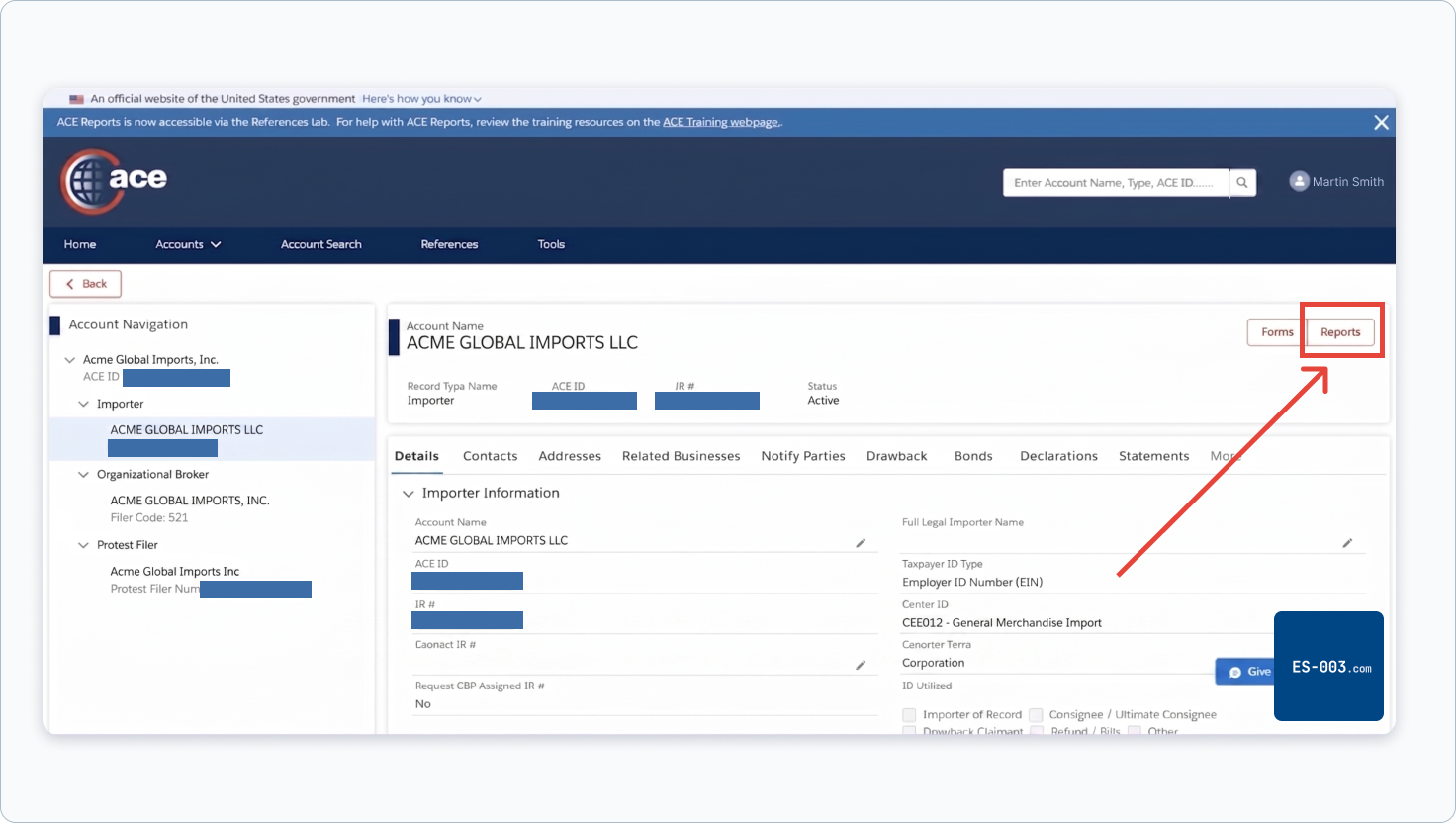
In your Importer account, click the Reports button in the top right corner.
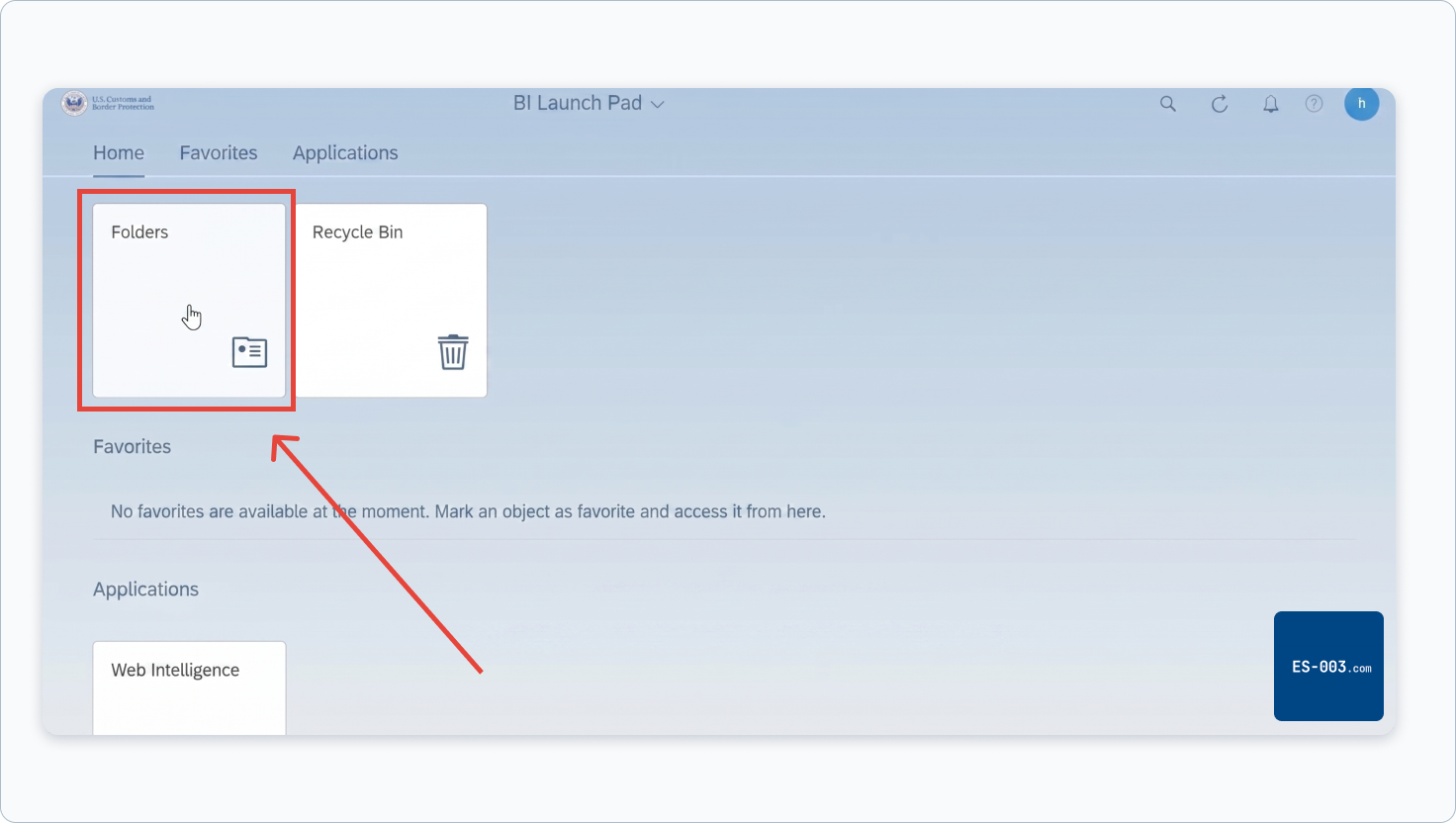
ACE will open the BI Launch Pad in a new tab. Click the Folders box.
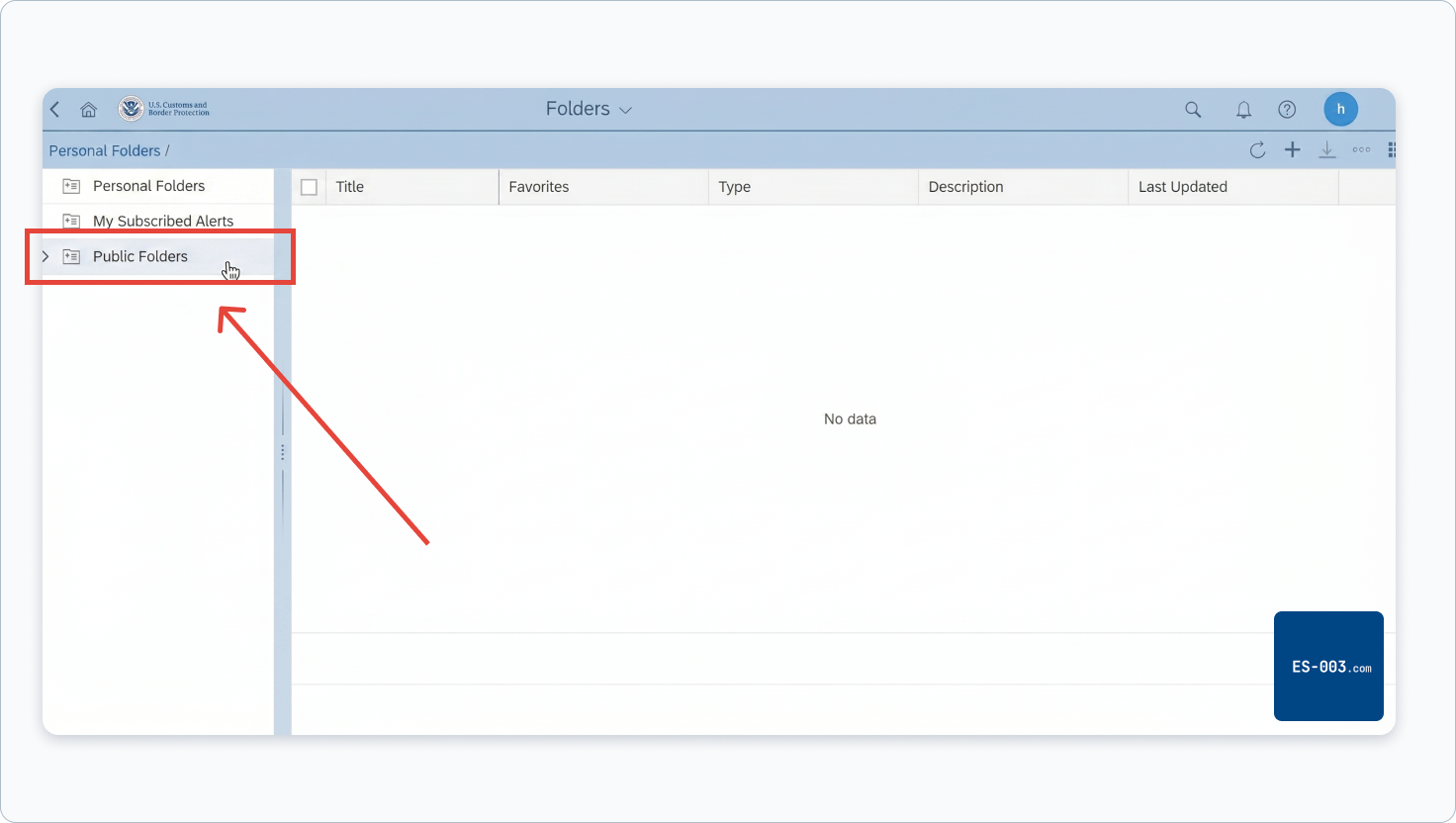
In the left panel, click the arrow next to Public Folders to expand it.
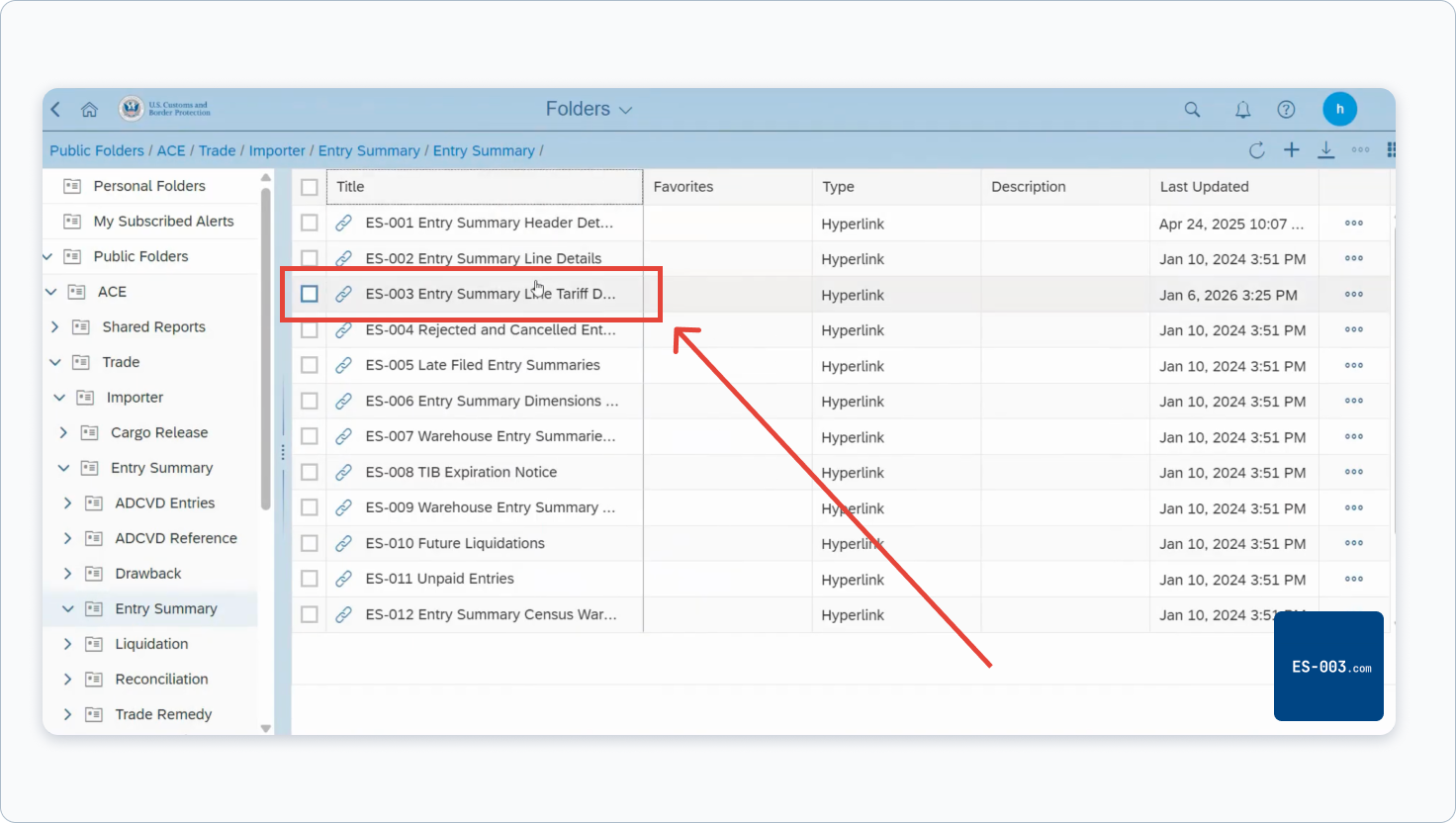
Navigate the tree: Public Folders → ACE → Trade → Importer → Entry Summary. Then click Entry Summary (the second one, nested inside the first).
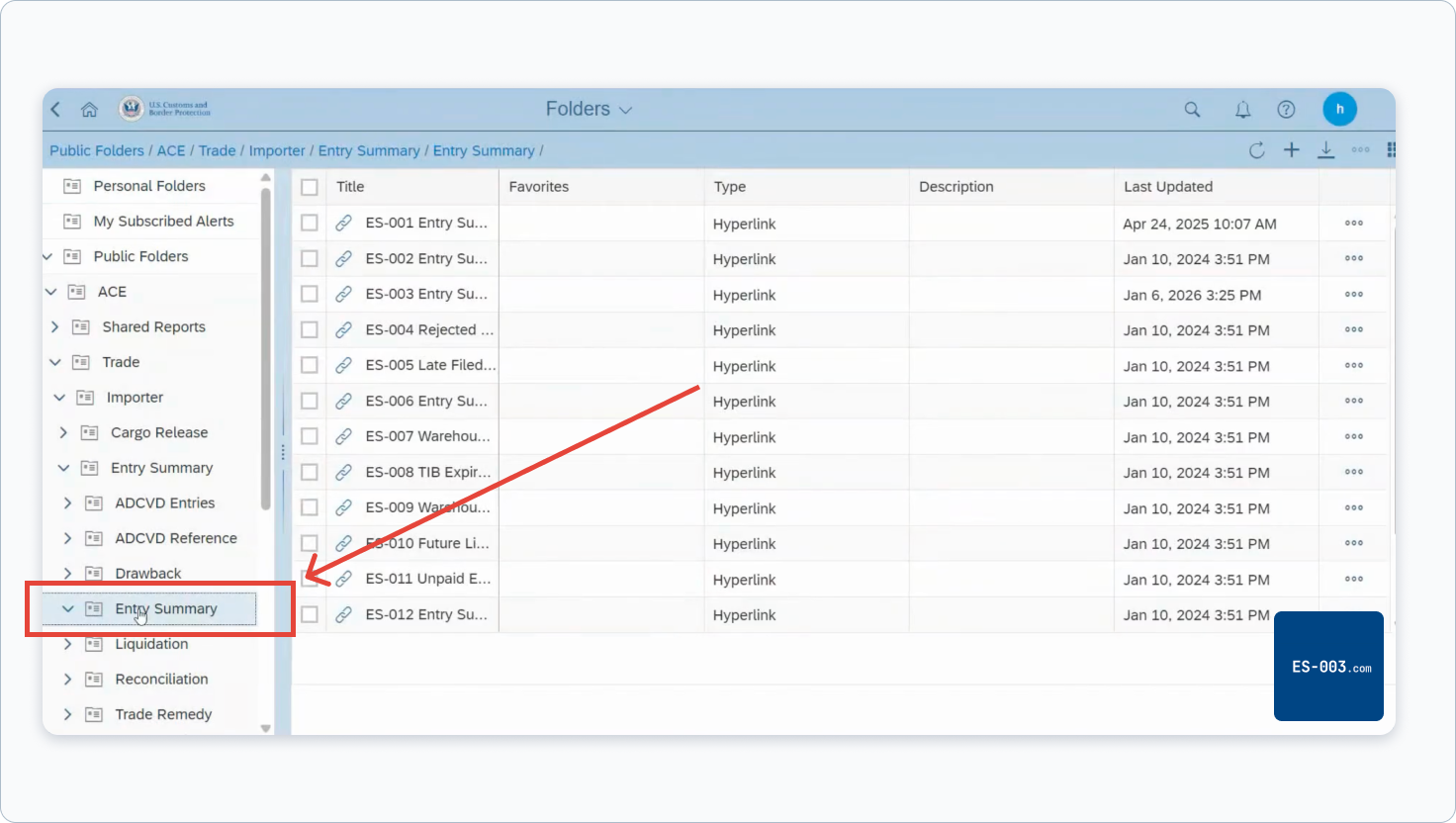
In the right panel, click ES-003 Entry Summary Line Tariff Details.
Step 3 – Fill In the Prompts
A Prompts dialog opens. First, select your Trade Account ACE ID — click the radio button next to your account name. Then click Entry Summary Date (Begin) in the left panel. An input labeled "Enter a date manually" appears on the right — type 2/1/2025 directly into that field.
Copy these values into ACE
Entry Summary Date (Begin)
2/1/2025
Entry Summary Date (End)
2/23/2026
Importer Number
All values
leave as default
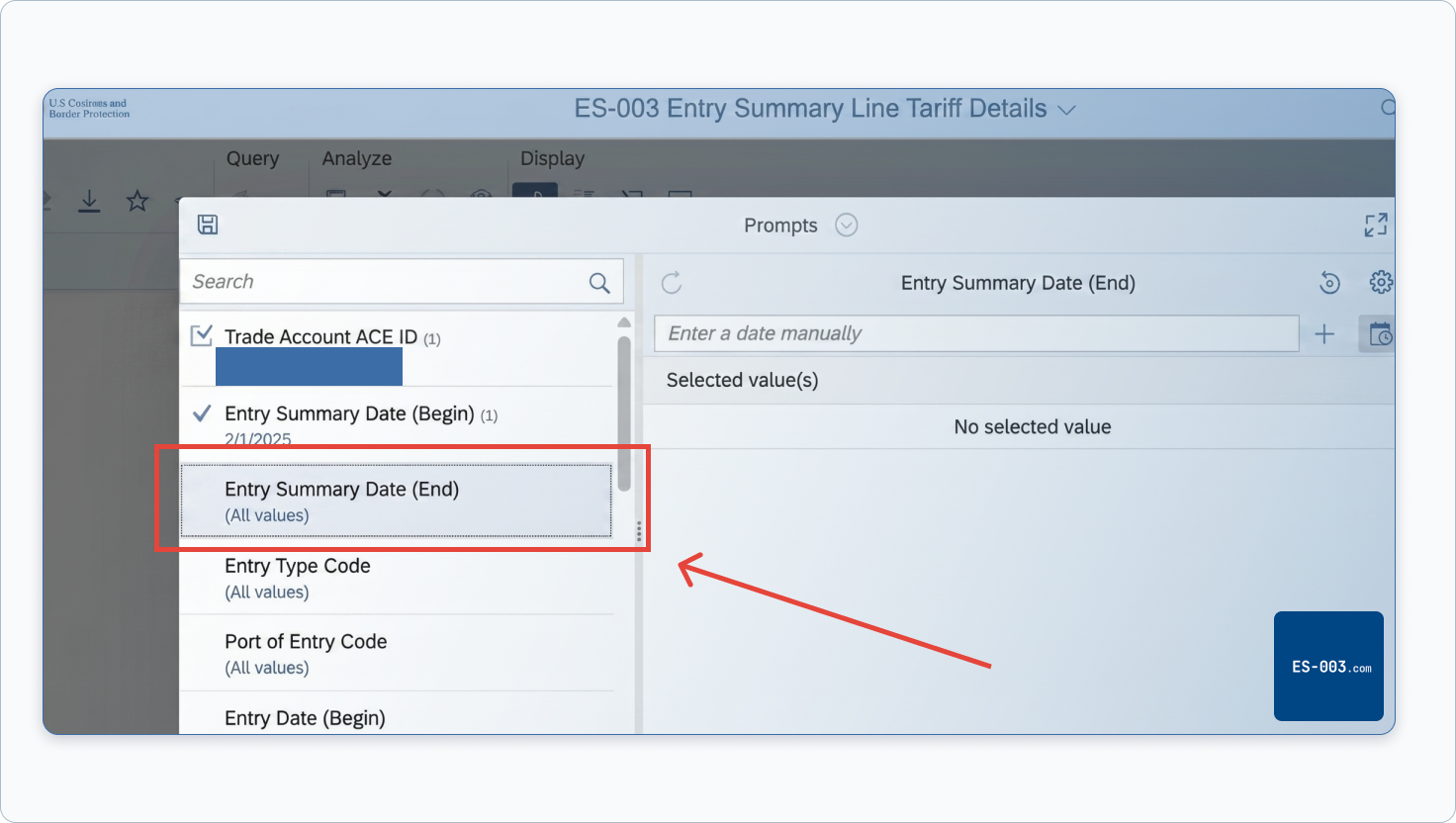
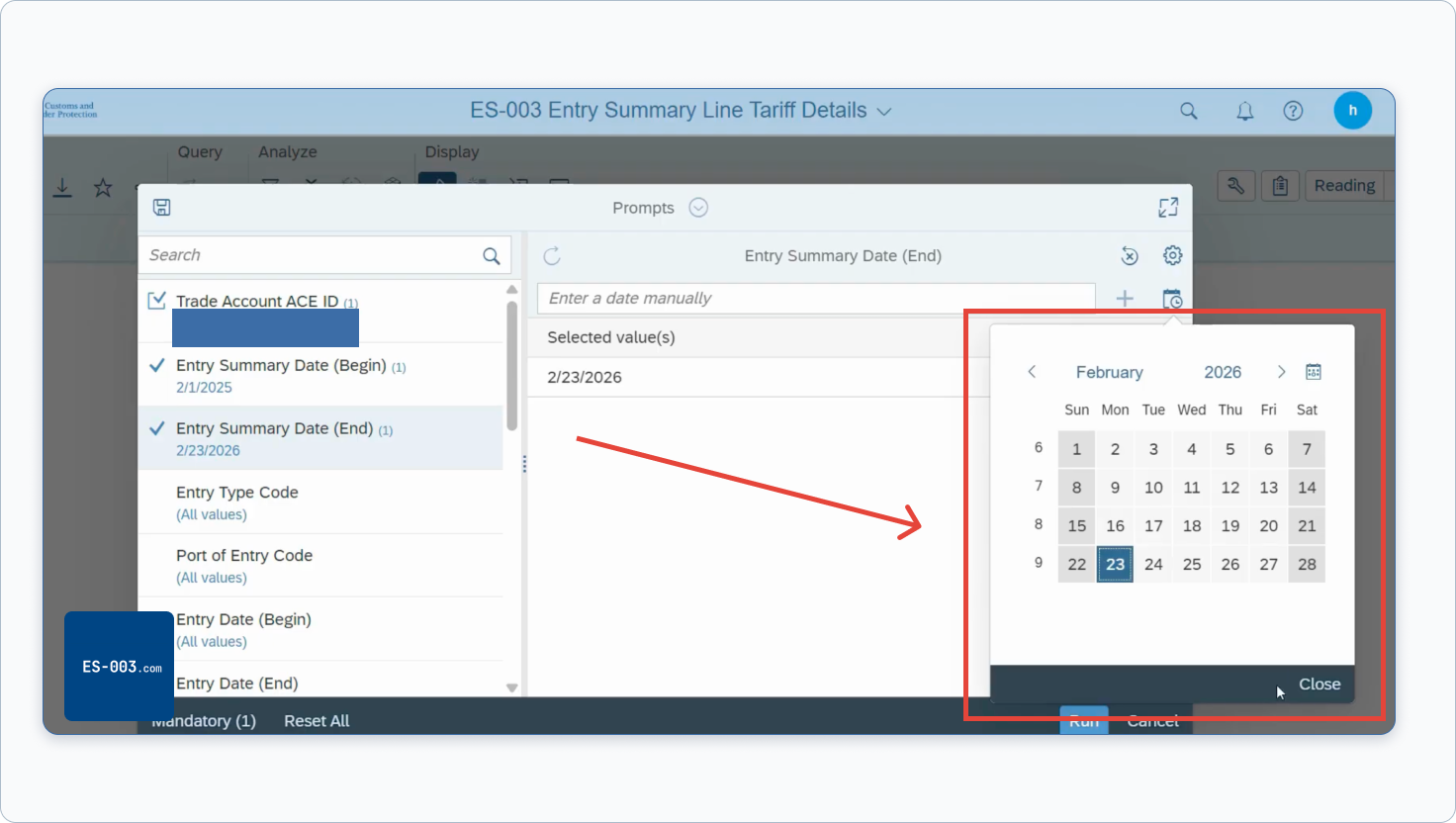
Click Entry Summary Date (End) in the left panel and type 2/23/2026 into the "Enter a date manually" field — this is the last day IEEPA duties were collected.
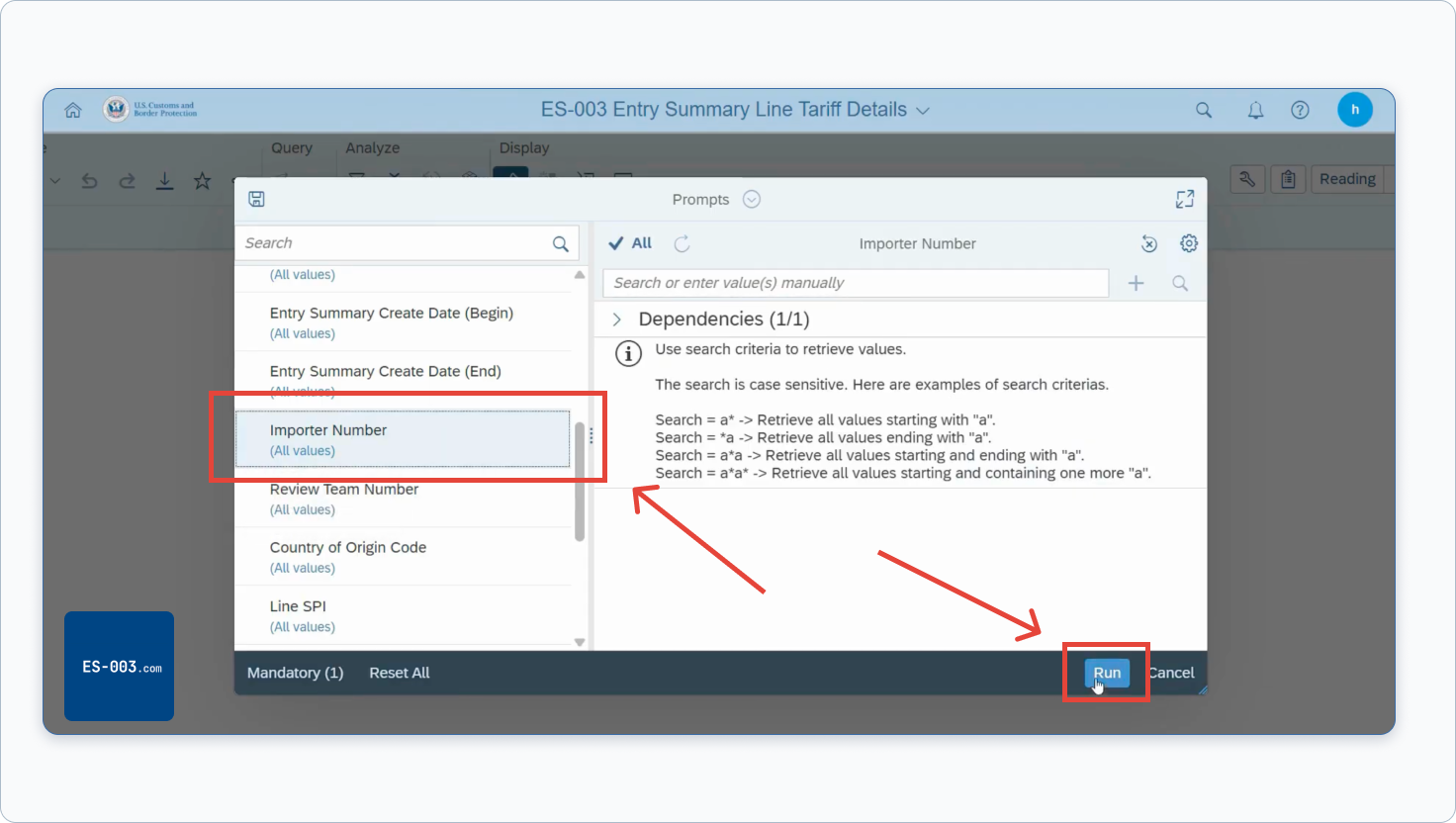
Leave Importer Number set to All values unless you want to filter by a specific IOR number. Click Run.
Step 4 – Configure Report Fields
After clicking Run, the report opens in the Query panel. This is where most importers make a mistake — the default ES-003 shows only basic entry header data. It does not include HTS codes, duty amounts, or liquidation data unless you add them manually.
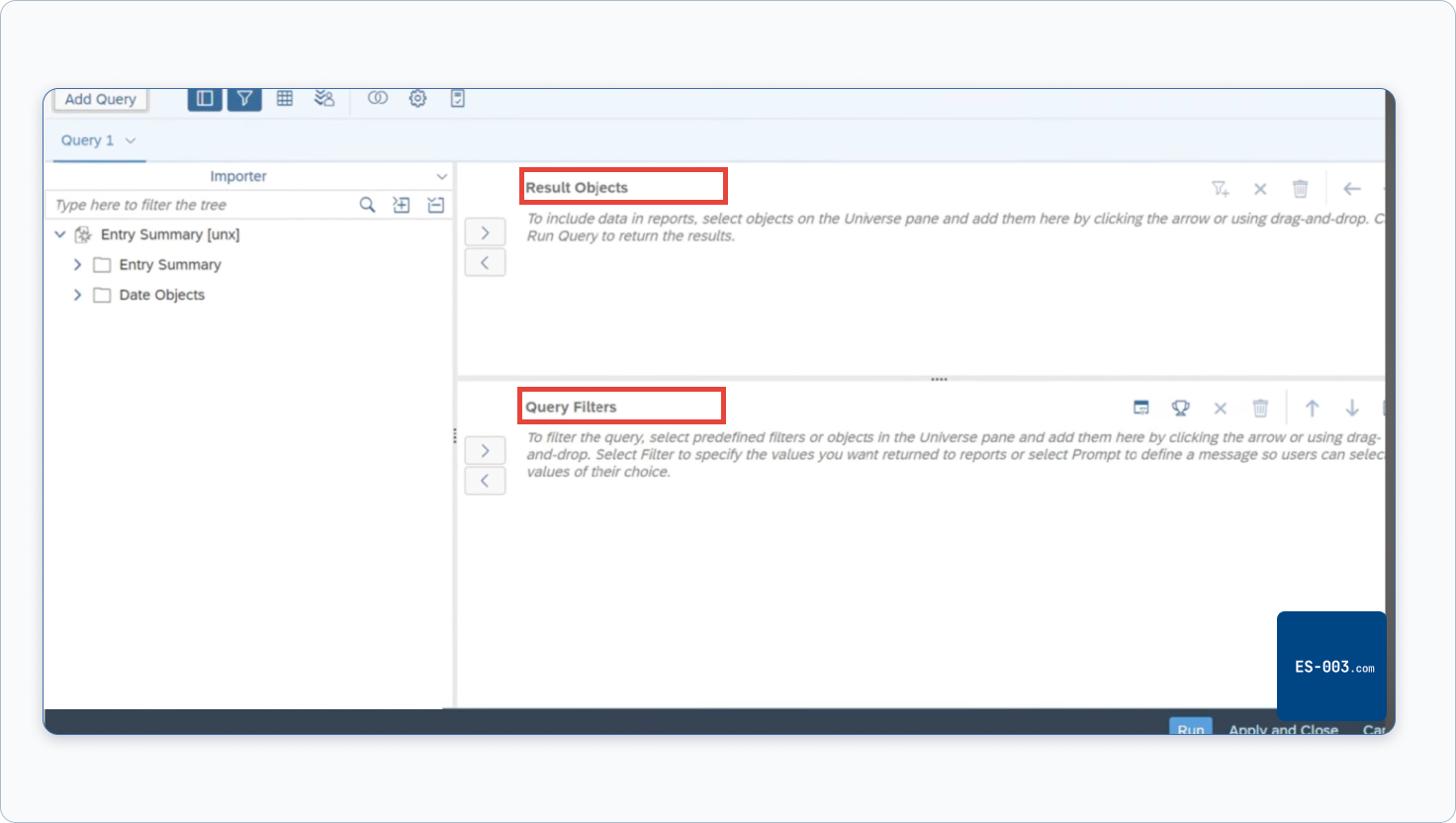
In the Query panel, look for the Result Objects area on the right — this is the list of columns that will appear in your exported file. Use the search bar on the left to find fields by name. Type a field name, then click the arrow button or drag it into the Result Objects box.
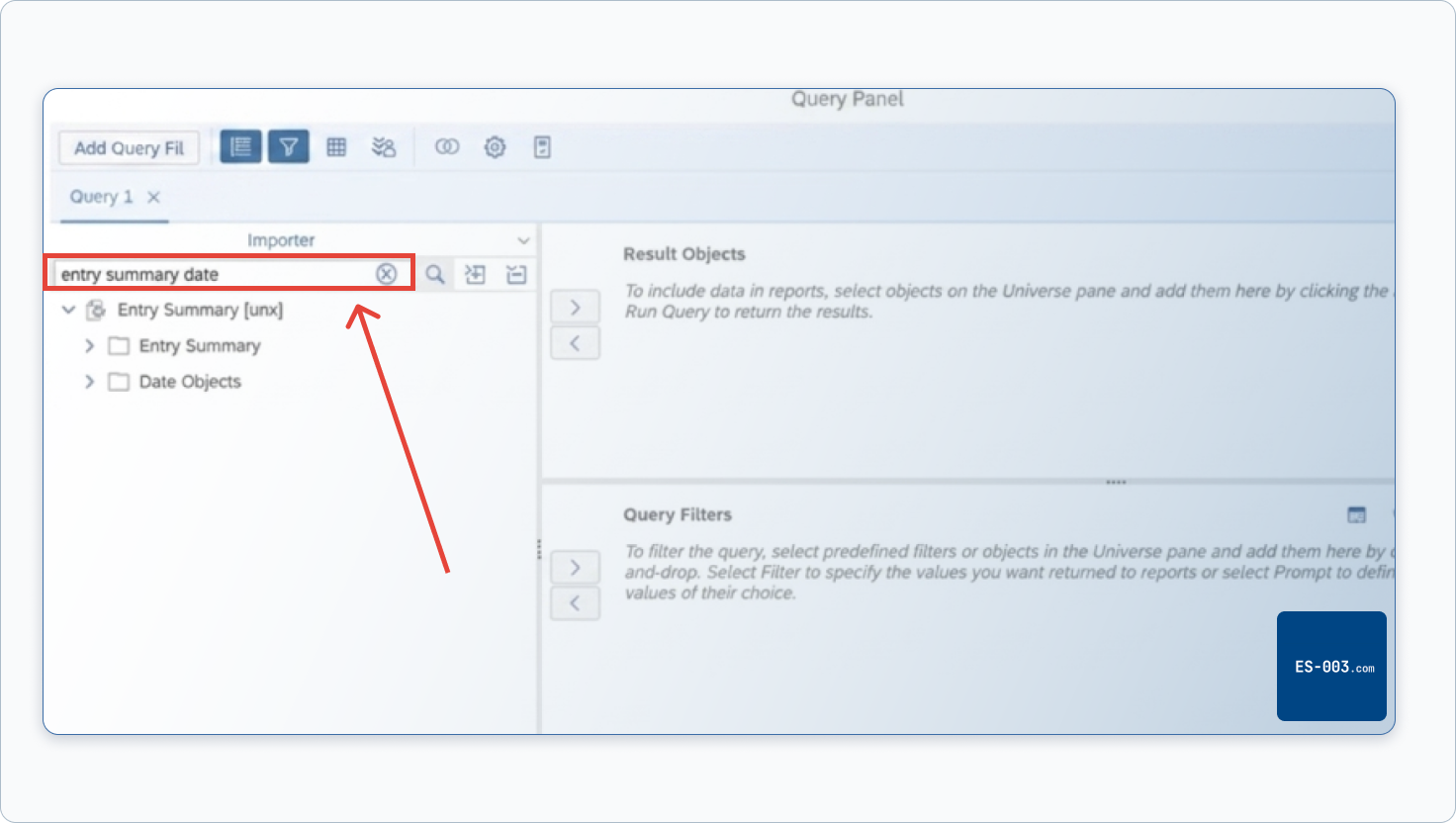
Start by typing "entry summary date" in the search bar to find the date field. Add it to both Result Objects and Query Filters.
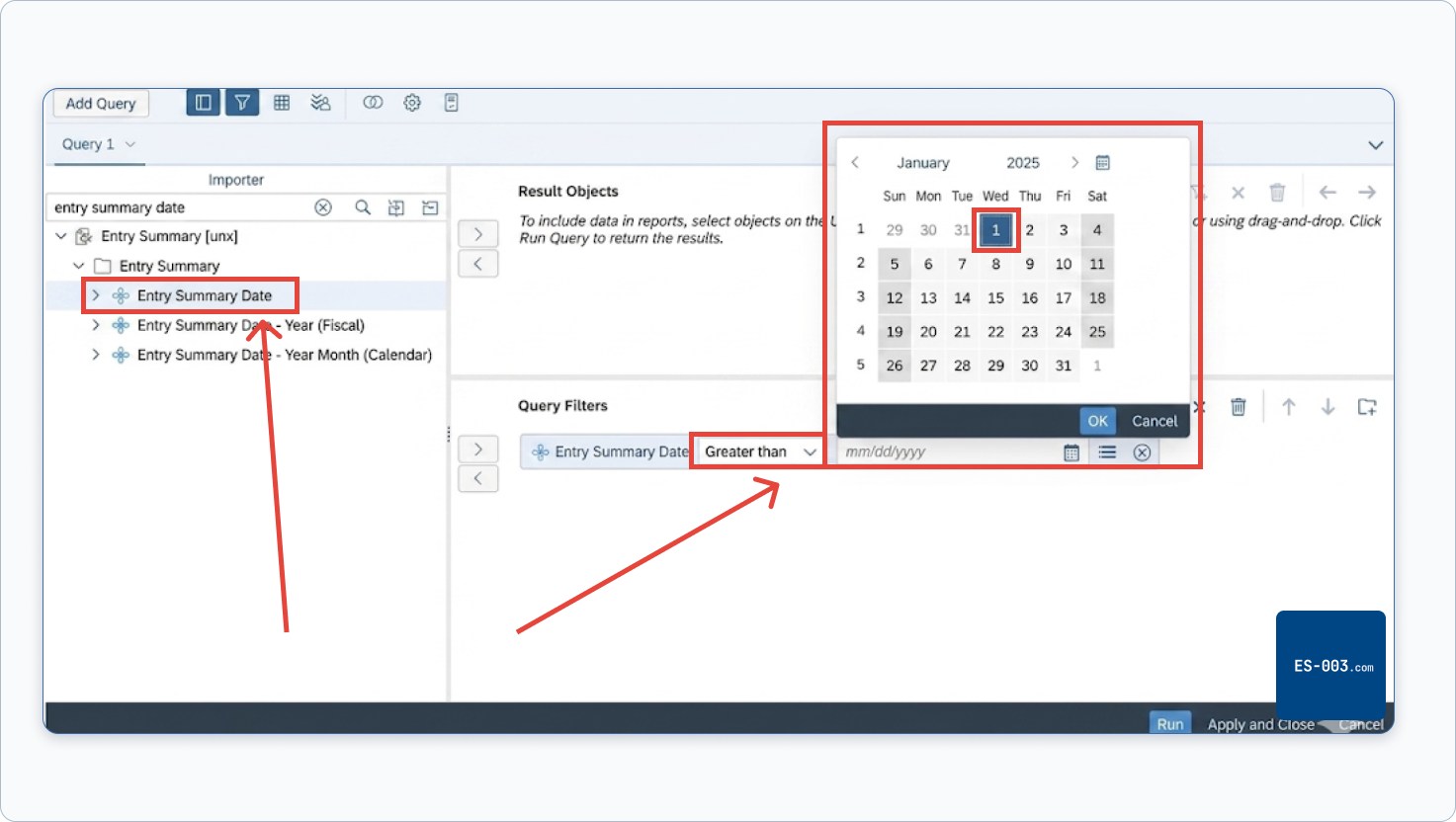
In the Query Filters section, set the condition to Greater than and select 1/1/2025 from the calendar. This limits the report to entries in the IEEPA window and keeps the file size manageable.
Next, search for and add these fields to Result Objects:
HTS Number – Full — the complete 10-digit HTS code including the Chapter 99 IEEPA code. Search for "HTS" and select "HTS Number – Full" (not just "HTS Number").
Liquidation Status — required to determine CAPE Phase 1 eligibility.
Liquidation Date — required to calculate the 80-day window.
Line Tariff Duty Amount — the dollar amount of duties assessed on each line.
Line Tariff Goods Value Amount — the declared value of the goods.
When done, your Result Objects should look like this:
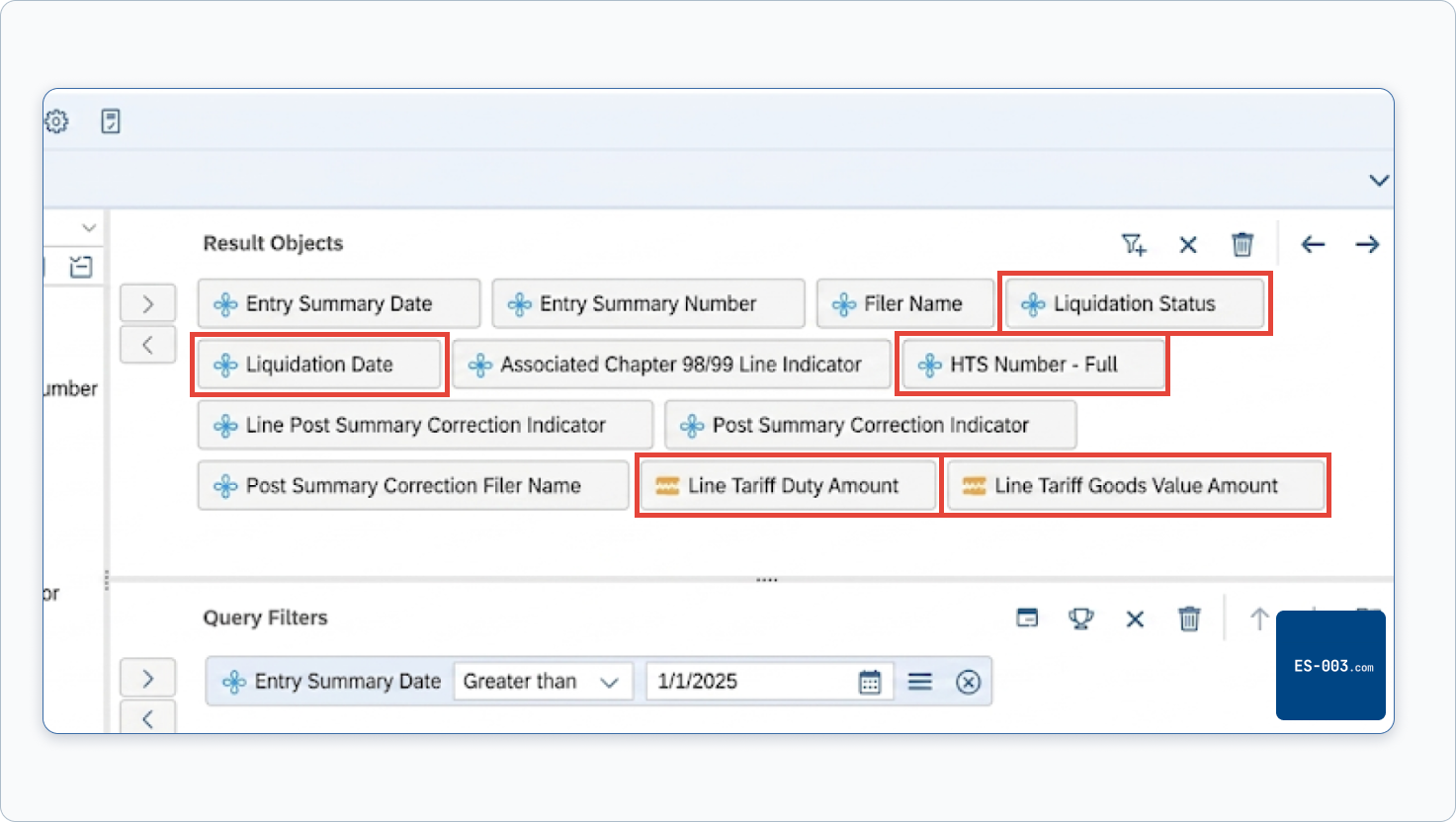
If you skip Liquidation Status and Liquidation Date, your exported file will not contain liquidation information and you won't be able to tell which entries are eligible for CAPE Phase 1 versus which ones require a Form 19 protest. If you upload that file to our audit tool, you'll see an error listing the missing columns.
Step 5 – Export as CSV
Once the report loads, click the three-dot menu (•••) in the upper left corner of the toolbar, select Export, choose Excel or CSV, and click Export again. Save the file — you'll upload it to the audit tool in the next step.
If the report times out before completing, see the Common Issues section below.
Step 6 – Audit Your ES-003 Before Filing
Upload your ES-003 to check every entry before it goes to CBP. Once a CAPE Declaration is accepted, corrections are permanently blocked — there is no way to fix an error after submission.
Drop your ES-003 here
or click to browse · CSV only
Your file stays on your device — parsed entirely in the browser, nothing uploaded to a server.
Required Fields – Don't Skip These
Liquidation Status and Liquidation Date are the two fields that trip up the most importers, so they deserve a closer look.
Liquidation Status tells you where CBP is in finalizing your entry. An entry can be: unliquidated (still open), liquidated (finalized), suspended (on hold, often for legal reasons), or extended. CAPE Phase 1 covers unliquidated entries and entries liquidated within the past 80 days. Entries liquidated more than 80 days ago are outside Phase 1 scope and require a Form 19 protest instead.
Liquidation Date is the date CBP officially finalized the entry. You need this date to calculate whether your entry falls within the 80-day window.
Neither field appears in the default ES-003 configuration. ACE Portal does not add them automatically. You have to select them explicitly when setting up your report fields. This is why so many Reddit threads show importers with ES-003 files that are missing liquidation data – the report ran without errors, it just didn't include those columns.
The table below shows all fields you should include:
| Field | Required for CAPE | Notes |
|---|---|---|
| Entry Number | Yes | Primary identifier |
| Entry Date | Yes | Must be in IEEPA window |
| HTS Code | Yes | To identify 9903.01/9903.02 codes |
| Entered Value | Recommended | Useful for refund estimate |
| Duty Amount | Yes | Filter by HTS to find IEEPA lines |
| Liquidation Status | Yes | Determines Phase 1 eligibility |
| Liquidation Date | Yes | Determines 80-day window |
ES-003 vs TR-011 – Use ES-003
Before February 2026, some customs brokers and importers used the TR-011 report for duty analysis. That approach no longer works for IEEPA purposes.
CBP deactivated IEEPA-related HTS codes in the TR-011 report on February 24, 2026. TR-011 still exists in ACE Portal but will return incomplete or missing data for 9903.01.xx and 9903.02.xx codes. If you run TR-011 today expecting to see IEEPA duties, you'll likely see nothing or incorrect totals.
Use ES-003. It's the report CBP references in official CAPE guidance and it's the format that CAPE preparation tools expect.
Common Issues
Liquidation Status Is Missing from My Report
You didn't add it to the field configuration when setting up the report. Go back, edit the report configuration, add Liquidation Status and Liquidation Date explicitly, and re-run. There's no way to add these columns after the fact – you need to regenerate the file.
Report Times Out or Won't Load
ACE Portal has been under heavy load since CAPE Phase 1 launched on April 20, 2026. If your report times out, try running it during off-peak hours – early morning or late evening US Eastern time tends to be more reliable. Also try narrowing your date range and running multiple smaller reports instead of one large one covering the full period.
If the report loads but shows no data at all, check that your importer sub-account is properly linked to the correct EIN. Duplicate EIN errors can cause the report to run without returning any entries.
IEEPA Duties Showing as $0.00 or "FREE"
Some entries show IEEPA HTS codes with a duty amount of $0.00 or a "FREE" filing status. This happens when an entry was filed under a CAPE code but the duty line was cleared as free – for example, entries that came in under an exemption or where the importer paid nothing in IEEPA duties despite the code being present.
These entries will appear in your ES-003 but are not eligible for a refund – there's nothing to return. When you prepare your CAPE Declaration, these entries should be excluded or will be filtered out automatically by CBP's secondary validation.
What to Do Next
Check CAPE eligibility for one entry
Once you have your ES-003 CSV with liquidation fields included, audit it before building your CAPE Declaration. Once a CAPE Declaration is accepted, Post Summary Corrections are permanently blocked on every entry in it — any error discovered afterward results in a permanent loss of refund for that entry.
Upload your ES-003 to the Pre-CAPE Audit tool to get a full pre-CAPE audit: every entry is flagged Green (ready to submit), Yellow (needs review), or Red (do not submit). Clean entries generate a CAPE-ready Declaration CSV automatically.
See the CAPE Filing Guide for the exact format and submission process.
Frequently Asked Questions
What's the difference between ES-003 and TR-011? Both are ACE Portal reports, but TR-011 was deactivated for IEEPA HTS codes on February 24, 2026 and no longer returns reliable data for IEEPA duty analysis. ES-003 is the report CBP references in official CAPE guidance. Use ES-003.
Why is Liquidation Status missing from my ES-003 file? It's not included in the default report configuration. You need to add it manually when setting up your ES-003 report fields. Re-run the report with Liquidation Status and Liquidation Date explicitly selected.
My ES-003 shows IEEPA duty as $0.00 – does that mean I get no refund on that entry? Correct. If the IEEPA duty amount is zero, there's nothing to refund on that line. The entry will either be excluded automatically when you submit your CAPE Declaration, or CBP will filter it during secondary validation.
Can I use my ES-003 to check entries from before February 2025? You can pull the report for any date range, but only entries with an entry date from February 4, 2025 through early February 2026 are eligible for the IEEPA refund. Entries outside that window contain duties collected under different authority and are not covered by CAPE.